

Vibe Edit PDF in Action: Real-World Editing Scenarios
Vibe Edit by Forma has just launched, and it’s already changing the way people edit PDFs. To show you how it works and what it’s capable of, we’ve put together a few real-world scenarios. Follow along to see how Vibe Edit handles common document tasks—and why you’ll probably never want to manually edit PDFs again.
1 “Changing the Way People Edit PDFs”… Really?
Yes, really! Just think about how much AI has changed the way we search for information. Instead of browsing through endless search results and opening links one by one to find the answer we need, we can simply ask an AI chat and get it instantly.
Vibe Edit PDF works pretty much the same way. Instead of working as a traditional PDF editor, it takes document management to a whole new level. All you have to do is tell it what to do with your document in a prompt, sit back, and watch Vibe Edit PDF get to work.
Need to proofread your document? Make a few adjustments to the tone? Rewrite the whole thing? Translate it into Hindi? It can handle all of that, no problem.
Forget about using complex editing software, slogging through a mountain of guides and manuals, switching between toolbars, or dragging text boxes around. Unlike traditional AI chats, which only suggest changes, Vibe Edit PDF makes them directly in your document—no copying, pasting, or manual editing required. Just describe what you want in plain language, and the tool updates your PDF. And you don’t have to worry about the layout breaking after a single change—it keeps everything exactly as it was in the original file.
Before we dive into some real-world examples, there’s one more thing. The scenarios below cover a range of professional situations that come up from time to time. But if your needs are simpler, Vibe Edit handles those just as easily. For instance, you can:
- Update a date, name, or job title in a contract
- Quickly fix typos in essays or documents
- Polish a CV so it reads like a native speaker wrote it
- Proofread assignments for grammar, spelling, and punctuation
- Change the tone of a cover letter to match your style
- Generate titles and subtitles for articles
2 Case 1: A Last-Minute Request from a Client
Who: An account manager.
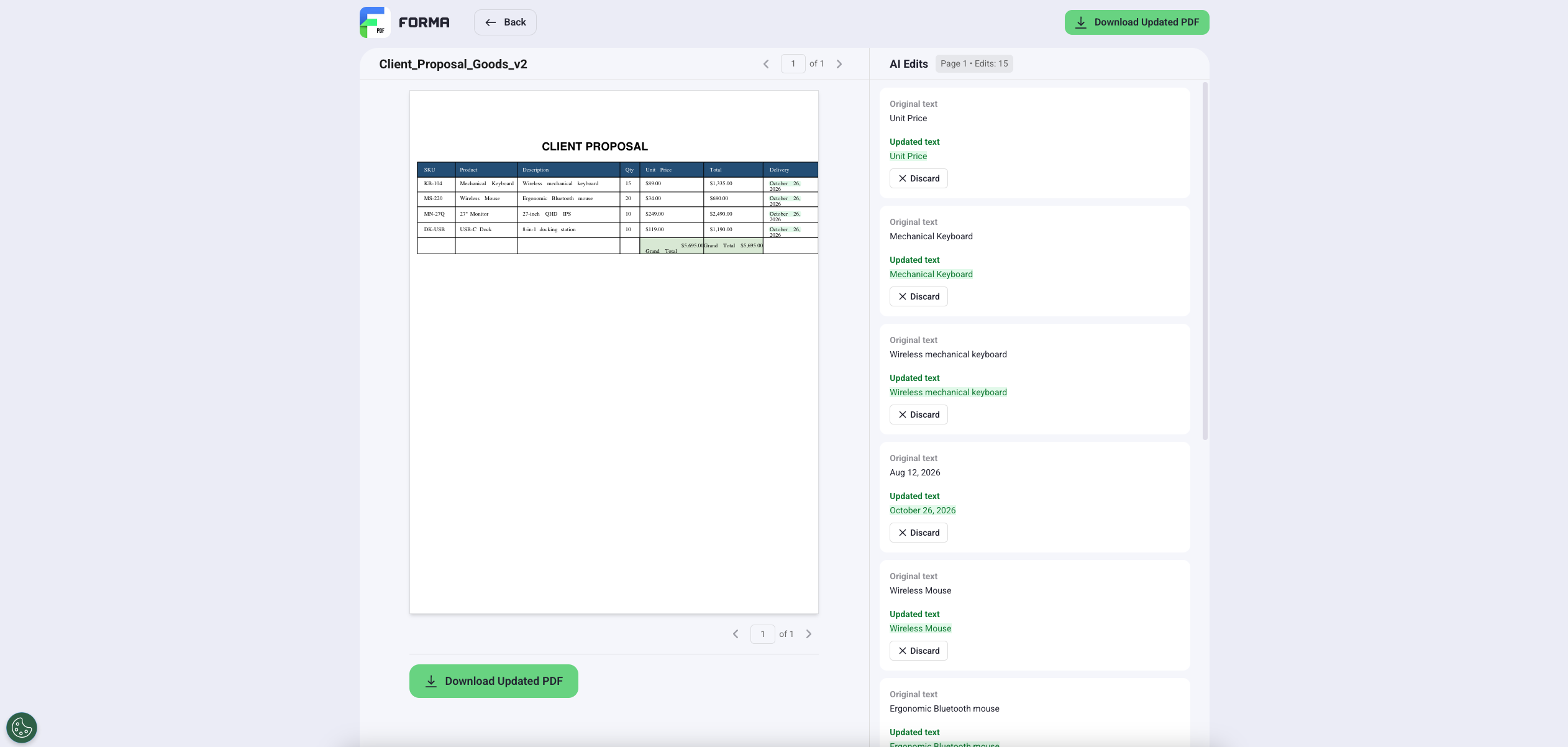
The challenge: After sending your proposal, the client responds requesting a few changes.They want to swap out several products, update one product description, and shift the delivery dates. It’s 5:45 PM, and the proposal has to be submitted before the EOD.
The solution: Upload the original proposal to Vibe Edit PDF. Type three commands, one by one: “Replace the goods list with [paste the updated list from the client’s email],” “Update the delivery date to October 26,” and “Change the description of [product name] to [paste the updated description from the email].”
The result: The client gets the fully updated proposal in a few minutes, well before the end of the workday.
3 Case 2: Fixing an Offer Right Before Signing
Who: An HR manager.
The challenge: You’ve prepared a job offer for a new employee, but several last-minute changes come in unexpectedly. After the final interview, the candidate is now being offered a Project Manager position instead of a Product Manager role. The start date has shifted, and the salary has been updated. The candidate is already waiting in the corridor to sign the agreement.
The solution: Upload the draft agreement to Vibe Edit PDF and give a few simple instructions: “Change the job title from Product Manager to Project Manager,” “Update the start date to August 11,” and “Change the annual salary from $52,000 to $55,000.”
The result: The updated agreement is ready in moments, with all necessary changes applied. You don’t need to postpone the meeting or make the candidate wait.
4 Case 3: A Client Changes the Score at the Last Minute
Who: A freelance designer.
The challenge: Your client has approved the project and is ready to sign the proposal, but they ask for a few last-minute changes. They request additional logo concepts, increasing the design fee. You need to update the proposal before sending it for signing.
The solution: Upload the proposal to Vibe Edit PDF. Type two commands, one by one: “Change the logo design fee to $2,000,” and “Update the total amount in the pricing table.”
The result: The proposal is updated in seconds with the new pricing, and you send the updated version to the client for signing without delaying the project.
5 Case 4: Cutting Costs When Onboarding a Foreign Contractor
Who: A small-business owner.
The challenge: You need to onboard a contractor from France who doesn’t speak English. However, all your onboarding materials are in English. You don’t have the time or budget for professional translation services. Pulling your French-speaking colleague away from their work to translate all the guidelines isn’t an option, either.
The solution: After uploading your first guideline to Vibe Edit PDF, instruct it to “Translate this PDF into French.” You can also do this by clicking the Translate button and choosing French from the list. Download the translated file and repeat the process with each new document.
Pro tip: If you don’t want to submit each guideline separately, you can merge them online and upload them as a single file to Vibe Edit PDF.
The result: You have all your onboarding documents translated instantly, with the original layout perfectly preserved. No extra time or budget required.
6 Case 5: Updating an Outdated Catalog
Who: An auto sales agent.
The challenge: The information in your car catalog has become outdated. The prices for all Japanese car listings have increased by $300.
The solution: Give Vibe Edit PDF this task: “Increase the price of each car for [brand names] by $300.”
The result: The catalog is updated in a couple of seconds, without even opening it. There’s no need to involve a designer—the layout stays perfectly intact.
7