

AI Summarizer: How to Make Sense of Long Documents
Have you ever opened a 1,000-page report and felt your brain freeze? Or stared at a pile of research papers and had no idea where to start? With so much information coming at us every day, reading everything is just not realistic. That’s why more and more people are turning to AI summarizers. These smart tools help you cut through the noise and save hours of manual work. And with apps like Forma, getting started is easy.
1 Why an AI Summarizer Is More Useful Than Ever
The amount of data we encounter every day keeps increasing, and many of us suffer from information overload. Students juggle textbooks and research papers. Professionals manage reports, contracts, and emails. Teachers prepare lessons from dense materials. With time in short supply and information coming from every direction, traditional methods like reading and taking notes on your own can’t keep up.
That’s exactly where an AI summarizer can come in handy. It scans your document, identifies key points, and delivers a clear, concise summary in seconds. No more skimming for hours or missing important details—just the insights you need, when you need them.
2 What Can an AI Summarizer Actually Do?
You may be wondering: is this just a fancy highlighter, or does it really understand context? A good AI summarizer like Forma’s does more than just shorten text. It can:
- Identify main ideas and supporting arguments
- Extract key data points, dates, and names
- Break down complex topics into easy-to-understand explanations
- Give quick answers about key points, dates, findings, or sections
- Adapt summary length based on your needs (short overview or detailed breakdown)
So when does this actually help in real life? Here are a few common scenarios where an AI summary generator can make a real difference.
3 Real-Life Moments When You Need Help
1. Learning and Research
Imagine you are a student getting ready for exams. You have seven textbooks and two dozen journal articles to review. Instead of going through every page, you can use Forma to quickly scan the files. The app’s AI summarizer pulls out core concepts, definitions, and arguments. As a result, you get study notes in minutes, not days.
Researchers can benefit, too: upload a pile of papers and let the tool surface the most relevant findings.
Pro Tip: Keep your Forma files in folders based on topics or projects. This way, you can revisit past summaries and build a personal archive.
2. Work
Are you starting a new job? Your employee handbook is 90 pages long. Beginning a side project? The instruction manual is dense and technical. Facing a financial audit with hundreds of pages of statements? Going through piles of legal reports? Instead of drowning in details, use Forma’s AI summarizer to immediately get to the point and grasp the essentials.
Pro Tip: Ask the app specific questions like “What risks are mentioned?” or “List the key deadlines.”
3. Everyday Life
AI summarization is not just for work or school. It can also help with everyday tasks. Need to understand a medical report before your next appointment? Reviewing insurance documents? Looking through legal paperwork? Use an AI summarizer to understand the main points before spending time on the finer details. This can help you feel more confident when making important decisions.
Pro Tip: You can use various file formats and even handwritten notes.
4 How to Summarize a Document with Forma
Here’s a simple flow to make a summary:
- Import or scan your file: Open the Forma app and upload your PDF. You can also use your phone’s camera to scan a paper document.
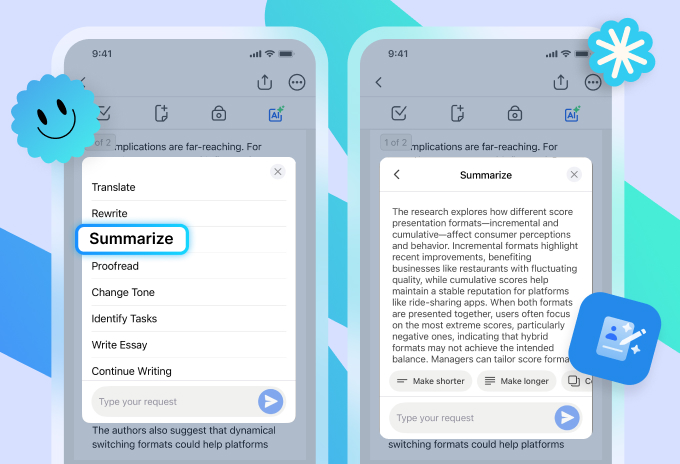
- Tap “AI”: Forma’s OCR technology converts your document into a digital, interactive file. You’ll then see a drop-down menu.
- Choose “Summarize”: The app identifies key ideas and presents them in a short form. You’ll get a clear summary in seconds.
- Review and refine: Read the generated summary. You can ask follow-up questions like “What is the key message?” or “Explain this section in simpler terms.”
- Make the summary longer or shorter: Use the corresponding buttons below.
- Export or share: Need a summary PDF to share with your team? Forma lets you export the summary as a clean, readable file.
Pro Tip: For very long documents, try breaking them into smaller chunks. For example, you can summarize them chapter by chapter. This often gives you more detailed and accurate results.
5 Why Use Forma and Not Just Any Chatbot?
You might ask: can’t I just paste text into a chatbot? Yes, but Forma is built specifically for working with documents. It’s more than just an AI summarizer—it’s a full toolkit for handling PDFs and other file formats. It helps you scan, import, understand, organize, and refine your documents from start to finish.
Here’s what you can do with Forma and what sets it apart:
- Polish your documents: Forma helps improve the visual clarity of your file, so summaries and exports look clean and professional.
- Keep the original structure: If you need to preserve headings, lists, or formatting, Forma’s smart recognition keeps your document organized just as it was.
- Edit on the go: You can make quick changes to your text, adjust summaries, or add notes—all in the same app.
- Stay organized: Instead of losing files in a chat history, save summarized documents directly to a project folder. Everything stays organized and easy to find.
6 Making the Most of Your AI Summarizer
Like any tool, you get the best results when you use an AI summarizer thoughtfully. Here are a few tips:
- Be specific with your requests. Instead of just hitting the “Summarize” button, try “What are the key problems outlined in this report?” or “List the main events in chronological order.”
- Combine summarization with questioning. After getting a summary, ask the AI to explain a confusing term or expand on a particular point.
- Use summaries as a starting point, but don’t stop there. Always review the original document for critical decisions. The AI helps you focus and identify key insights, but your judgment is irreplaceable.
- Save and organize your summaries. Forma lets you store summarized files, so you can build your own knowledge library over time.
7 Final Thoughts: Work Smarter, Not Harder
Tools like Forma are not about doing less work—they are about doing better work. An AI summarizer helps you cut through information overload so you can focus on what truly matters: understanding, thinking, and deciding. Whether you are a student prepping for exams, a professional managing complex projects, or just someone trying to keep up with daily reading, these tools put you back in control.
So next time you face a mountain of text, take a breath. Open Forma. Let the AI summarizer do the heavy lifting. Then step in with your own insight to make sense of it all. That’s how you find meaning in big texts and take informed action.